Pages

Thursday, 28 February 2013

How to change password without knowing old password

In this article I have given the tricks on how to change the password without knowing the existing one. This trick is mainly used for the people who forgot their admin password. The trick is also used to change other user’s password because it will allow you to change the password without knowing the old password. I hope everyone may use this trick for good purpose.

How to change password without knowing old password

Step 1: Follow the below steps to view all user accounts.

  • StartàRunà Then type ‘CMD’.
  • In the command prompt window, type ‘cmd net users’.This will show you the user account on that computer including the hidden accounts. 

Step 2: Just follow the below steps to change the account password

  • Logged into the computer that has administrative rights. Then go to StartàRunàtype ‘CMD’.
  • In the command prompt window type ‘net user’ space ‘the name of the account’ then * and press enter. Example: net user administrator * or net user "TRICKS GOD" *. (Put the name in quotes if it contains spaces)
  • It asks you to enter the new password. Type the new password very carefully because command window won't display what you type. 
  • Reenter the same password once again to confirm it. 
  • Then you will get a success message. 
You’re done. Now you can access the user  accounts. 

Tuesday, 26 February 2013

How to login into systems without password


Hi friends, many of us have password protection in our computers to secure personal information and details. If you forgot your password, you can login into the system without password or if you want to login to others computers just follow the below tricks. Many of you may know this trick but still for those who are not aware of it can use this trick. This trick will 100% works on XP but I don’t know whether it works out in other operating systems.

How to login into systems without password

Step 1: Start your computer
Step 2: When it asks for password press ctrl+alt+delete keys twice.
Step 3: Now another one window will open and asking for password.
Step 4: In that window, at the place of user name just type administrator and leave the password field blank and press enter.
Step 5: Now you have logged in as a normal user

Limitation:
Now you have full authority and the only problem is that you can't open My Document of the original account. To overcome this limitation, just use any one of the file recovery software and move the files from My Document to any other folder in other drive.

Sunday, 24 February 2013

How to change the driver letter of a computer


Many of us don’t know about the possibility to change the driver letter or path of our computer. This will cause some problems to your programs, but you can change the settings at any time you want. You may think what the purpose of doing this and risking the files of your computer. You can amuse your friends by this tricks which many of them don’t know.
How to change the driver letter of a computer
Suppose you are working on a video editing project and for some reason you need to shift your work to another computer. You were working on the previous computer with 'G' drive and it is not available in the new one. Then what will you do? Definitely you won't love to do everything from the scratch. In this situation you can change the drive letter of the new computer to 'G' and copy the raw files to it and continue the work as usual.

You can’t change the name of the drive by right clicking. You won't find the rename option. Here I am going to explain how you can change the letter or path your drive. Just follow the below steps. 
  • Right click on My Computerà Select ‘Manage’. New window will open. In that window browse 'Disk Management' option.
  • Right click on the drive which you want to change the drive letter. Click 'Change Drive Letter and Paths' option
  • Click on 'change' and then select one of the drive letters available in the combo box and click on OK.
Now check your 'My Computer' and it is changed with the new path. If you want to change it back to the previous one just follow the steps once again and select the desired drive letter.

Limitation:
When changing the drive letter it causes some problems in some programs associated with the drive. For example, if you are working on a video editing project and all your raw video files are stored in a drive say 'E' and if you change it's letter to something else the project file may find it impossible to read the file. So, be careful while doing this.

Saturday, 23 February 2013

Tips to set password to Microsoft office files


Tips to set password to Microsoft office files

It is easy to set password to Microsoft Office files like .doc, .ppt, etc. If you set password for each and every files then it becomes secure and other peoples can’t open it. In this article I have given the tricks on how to set password to Microsoft office files. Just follow the below instructions to keep your files safe.

Step 1: Open Microsoft office's component such as Word, Powerpoint, Excel etc.

Step 2: Click the Office button 

Tips to set password to Microsoft office files

Step 3: Click on Prepareà click  on  'Encrypt document'

Tips to set password to Microsoft office files

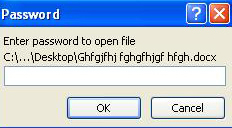
Step 4: Then one window will open.Enter the password in window and click Ok.

Tips to set password to Microsoft office files

Step 5: Then another window appears asking for password confirmation. Re-enter your password and click OK. Now the Password is set on the file. 

Step 6: Whenever you open the file it will ask for the password.  

Tips to set password to Microsoft office files


Thursday, 21 February 2013

How to Copy Text from Images


If you want information in the form of text from scanned copies or images, then you write the text by typing or use OCR software. OCR (optical Character recognition) software is used to extract text from images. It will recognize the handwritten, printed or typewritten text and reproduce them into editable word or txt format. They are not 100% accurate and the converted document still needs some editing. But it is better to use OCR software and do some editing rather to type the whole Document.

How to Copy Text from Images

If you have Microsoft office in your computer then you won’t require any other software. You can use Microsoft Office OneNote to copy text from image. In this article I have given the tricks on how to copy text from images using Microsoft office.
  • Install MS-Office on your system.
  • StartàAll ProgramsàMicrosoft OfficeàMicrosoft Office OneNote.
  • Copy and paste the image into MS-OneNote window which you want copy the text.
  • Right Click on the image and select ‘Copy Text from Picture option’.
  • Open a new Notepad or MS-Office word and paste the content.

Now you have the whole text in editable format. Then you can edit or format it for accuracy.


Wednesday, 20 February 2013

Tricks to access website and forums without Registering


Some websites and forums will not allow the users without registering. It forces the user to register and after registering only it will allow the users to access its features. Registering with websites and forums are the easy thing but it may be dangerous. Because nowadays lot of websites was hacked easily and unknown people can get your personal information through the websites.

Tricks to access website and forums without Registering

In this article I have given some tricks on how to access websites or forums without registering. All websites and forums will block unregistered users, but they won’t block Google Bot. What should we do is just to switch our User Agent to that of Google Bot and freely browse any website or forum without registering.
  • First grab the add-on for Firefox called 'User agent' here and install it.
  • Now go to Tools à User Agent Switcher à Options and then again to options.
  • Select User Agent from the left sidebar and click Add.
  • In the description field type: crawl-66-249-66-1. googlebot.com
  • In user agent field type: Googlebot/2.1 (+http:\\www.googlebot.com/bot.html)
  • Select Google Bot as your User Script by going to Tools à User Agent Switcher.

Now you can browse any website or forums without registering. 


Tuesday, 19 February 2013

Tricks to Play Movie in Paint


It is possible to play movie in Paint but many of us don’t know about it.  Here I have given a trick on how to play movie in paint.

Tricks to Play Movie in Paint

Step 1: Open Ms Paint.
Step 2: Open your Video player.
Step 3: Click on the Print screen Button on your keyboard.
Step 4: In Ms Paint use the shortcut ctrl+v or got to the Edit Tab and choose Paste option.
Step 5: Bingo!!!!

Limitations:
  • This works only with Ms Paint.
  •  Video player should not be closed and the movie should not be paused in the player.